Frequently Asked Questions
Everything you need to know about PublishJockey
Home / FAQ
Getting Started
How does PublishJockey compare to other publishing platforms?
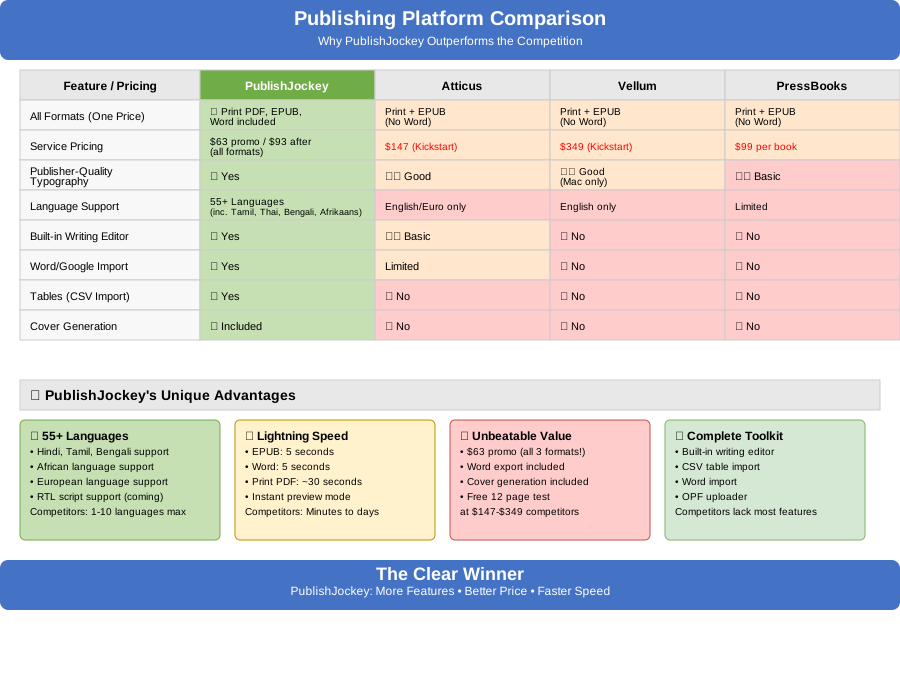
Key advantages that set us apart:
- 80+ Languages: We support Hindi, Tamil, Bengali, African languages, and more—while other platforms typically support only 1-10 languages.
- Unbeatable Value: All 3 formats (PDF, EPUB, Word) for $63 promo vs other services charging $147-$349.
- Lightning Speed: EPUB and Word exports in 5 seconds, PDF in ~30 seconds vs other platforms taking minutes to days.
- Complete Toolkit: Built-in editor, CSV table import, Word import, and cover generation—features competitors charge extra for or don't offer.
- Bookstore-Quality Formatting: Professional formatting technology that makes your book look like it belongs on the shelves at Barnes & Noble or any major bookstore.
Do I need to know any special formatting or coding?
Can I import my existing manuscript?
What if I've already written my book in Microsoft Word?
- Upload your Word document from your desktop.
- Ensure your chapters are marked using Heading 1 (H1) styles. These are used to split the document into chapters.
- Click "Process File."
- If processing is successful, you'll be able to download a ZIP file containing each chapter in Markdown format.
- Unzip the file, then import each chapter one by one into the app.
- Tables are fully supported and will be converted automatically.
- Image placeholders will be inserted automatically. You'll need to:
- Upload each image manually using the toolbar.
- Delete the placeholder once the image is uploaded.
- Centering and right-aligned content may not transfer correctly. To fix this:
- Select the content in the app.
- Use the toolbar to re-center or right justify it as needed.
Do I need to delete unused sections of my book?
Should I select my native language before creating my book?
- Book Structure: Your book outline (chapters, copyright page, etc.) will appear in your native language from the start.
- Copyright Generation: The copyright notice will be automatically generated in your language with proper legal terminology.
- Better Experience: All book sections and templates will be localized for your language.
What if I forgot to select my language?
Don't worry! The service still works perfectly, but:
- Your book outline will show in English initially
- You'll need to manually select your copyright language
- You can change your language anytime in settings, and the system will automatically correct the structure and copyright
We support 60+ languages including regional variants like Northern/Southern Sotho and African Portuguese, so you can always find the perfect match for your book!
Publishing & Exporting
What can I do if my AI-generated book cover is too low resolution for KDP?
How long does it take to generate my professional manuscript?
Do you offer real-time previews of my book?
Please note: certain formatting elements like tables, images, centered text, and right-justified content won't appear exactly as they will in the final export. However, rest assured—they'll display correctly in your finalized PDF, EPUB, or Word document.
Is Publish Jockey compatible with Kindle Direct Publishing (KDP)?
What export formats are available?
Are there any limitations when exporting to Microsoft Word?
- Images and tables will need to be manually centered.
- An extra title page may appear and should be removed.
- The table of contents won't update automatically—you'll need to refresh it within Word.
- You can customize the heading levels as desired to control what appears in the table of contents.
Keep in mind that Word export is offered as a convenience. Most publishers primarily require a PDF for print and an EPUB for digital distribution, which are the preferred professional formats.
Why does my finished book look so professional?
How does Publish Jockey compare to Microsoft Word for book publishing?
| Feature | Publish Jockey | Microsoft Word |
|---|---|---|
| Book Formatting | Professional, consistent | Manual, can be inconsistent |
| Print-Ready Output | Automatic, optimized | Requires manual setup |
| Large Document Handling | Excellent performance | Can slow down or crash |
| KDP Compatibility | Built-in optimization | Requires conversion |
| Consistency | Automatic across chapters | Manual style management |
| Learning Curve | Simple, focused on writing | Familiar but complex for books |
How are images handled when importing documents?
What if my Word document includes tables?
What if I need to create tables from scratch?
Does PublishJockey support mathematical equations?
Perfect For:
- STEM Textbooks: Math, physics, chemistry, engineering
- Academic Papers: Research papers and journal submissions
- Course Materials: Lecture notes, problem sets, study guides
- Thesis & Dissertations: Graduate-level academic work
Note: Perfect equation rendering is guaranteed in PDF exports. EPUB and DOCX formats may have limited equation support depending on the reader's device.
Can I use PublishJockey to publish textbooks or academic materials?
How can I insert an image without displaying a caption?
How do I resize an image in my book?
What are the fancy title style options for my book?
- Standard: Clean, simple chapter headers
- Classic Literature: Traditional book styling inspired by literary classics
- Modern Minimalist: Contemporary, clean design
- Academic Press: Professional academic formatting
- Classical Ornate: Elegant decorative styling
- Technical Programming: Clean, code-friendly formatting
- Magazine Style: Modern publication design
- Luxury Fashion: Sophisticated, high-end styling
- Small Caps Elegance: Refined small capitals design
- Decorative Script: Artistic script-style headers
- Thriller/Noir: Dark, dramatic styling with bold contrast
- Romance/Soft Literary: Elegant, flowing design with ornamental details
These styles automatically format your chapter titles with professional typography, spacing, and design elements that match the aesthetic of major publishing houses.
What are drop caps and which languages support them?
- None: Standard paragraph opening
- Traditional: Classic 3-line large letter design
- Raised: 2-line elevated letter above the baseline
- Large: 4-line dramatic bold letter
- Elegant: 3-line gray letter with small caps
- Bold: 3-line heavy sans-serif letter
- Decorated: 3-line bold with border and background
- Ornament: Illuminated manuscript style with decorative background
- Colorized: Two-tone blue colored initial
- Boxed: Magazine style with black rectangle background
- Old-Style: Vintage baseline-aligned 19th-century style
Supported Languages: Drop caps are currently available for English books only. This ensures perfect rendering and compatibility with our advanced publishing system.
Drop caps add a sophisticated, professional touch that's commonly seen in high-quality published books and literary works.
Pricing & Plans
What happens after my free trial or free book is complete?
Can I pay per book, or do I have to subscribe?
Can I try before I buy?
Are there any content limits for ebook subscriptions?
Book Ownership & Rights
Who owns the books I create with Publish Jockey?
How does Publish Jockey handle copyright protection for my work?
However, with our system, you retain full copyright and ownership of everything you upload and create. We never claim rights to your content, and we only use it to provide the services you've requested. Your materials remain your intellectual property at all times.
Should I register my copyright with the U.S. Copyright Office?
Publishing on Amazon KDP
Can you help me publish directly to Amazon KDP?
Is Publish Jockey compatible with Kindle Direct Publishing (KDP)?
Support & Community
Is there a community or forum where I can connect with other authors?
Future Features & Roadmap
Are you planning to add more features (e.g., audiobook support, advanced templates, more import/export formats)?
Real Output Samples
Can I see a real book created with Publish Jockey before I sign up?
Data & Privacy
How long do you keep my manuscript files?
How secure is my manuscript data?
Accessibility & International
Can I use Publish Jockey if I'm outside the US?
What languages does Publish Jockey support?
Interface Languages (UI):
• English (en) - Primary language
• Spanish (es) - Español
• German (de) - Deutsch
• French (fr) - Français
• Italian (it) - Italiano
• Russian (ru) - Русский
• Arabic (ar) - العربية
• Hebrew (he) - עברית
• Yiddish (yi) - יידיש
• Indonesian (id) - Bahasa Indonesia
• Hindi (hi) - हिन्दी
• Tamil (ta) - தமிழ்
Document Export Languages:
• Latin-based languages: English, Spanish, German, French, Italian, Indonesian
• Cyrillic languages: Russian
• Right-to-Left (RTL) languages: Arabic, Hebrew, Yiddish
• Devanagari script: Hindi
• Tamil script: Tamil
Each language has optimized font support and proper text direction handling for professional publishing.
Are there any limitations with Arabic, Hebrew, or Yiddish?
Pure Language Content: For best results with Arabic, Hebrew, and Yiddish, we recommend using pure language content only. Mixed content (English text, URLs, email addresses) may not display correctly in the exported PDF.
Font Selection: RTL languages use automatically selected fonts optimized for each language. Font selection is limited to ensure proper rendering.
Text Direction: These languages are automatically set to right-to-left text direction in exports.
Recommendation: If your content includes mixed languages, consider creating separate documents or using Latin-based languages for mixed content.
What fonts are available for different languages?
Latin-based languages (English, Spanish, German, French, Italian, Indonesian):
• Professional Book Fonts: Latin Modern Roman (high-quality academic typography), Nimbus Roman (similar to Times New Roman)
• Standard Fonts: Liberation Serif (Linux equivalent of Times New Roman), Liberation Sans (Linux equivalent of Arial), DejaVu Serif, DejaVu Sans
• TeX Fonts: TeX Gyre Termes, TeX Gyre Pagella, Linux Libertine
Russian (Cyrillic):
• Liberation Serif (Cyrillic), Times New Roman (Cyrillic), DejaVu Serif (Cyrillic)
Arabic:
• Noto Sans Arabic (automatically selected)
Hebrew:
• Noto Sans Hebrew, Noto Serif Hebrew, Noto Rashi Hebrew (automatically selected)
Yiddish:
• Noto Sans Hebrew, Noto Serif Hebrew (automatically selected)
Hindi (Devanagari):
• Noto Sans Devanagari (automatically selected)
Tamil:
• Noto Sans Tamil, Noto Serif Tamil (automatically selected)
Why Linux Fonts? Our platform uses professional Linux fonts because they offer excellent quality, are free and open-source, and provide consistent rendering across all devices and platforms. Latin Modern Roman and Nimbus Roman are particularly excellent for book publishing and academic work.
How do I change the interface language?
From the Navigation Bar: Look for the language selector in the top navigation bar. Click on it to see all available languages and select your preferred language.
From Settings: Go to your account Settings page and find the 'Language & Font Settings' section. Select your preferred interface language from the dropdown menu.
The language change takes effect immediately and will be remembered for future visits. Note that changing the interface language does not affect the language of your document content.
How does language switching affect my book's chapter structure?
New Projects: When you create a new book, the default chapter names (like 'Chapter 1', 'Title Page', etc.) will automatically appear in your selected interface language.
Existing Projects: For existing books, the chapter structure is loaded based on the language you had selected when you first accessed the project. If you want the default chapter names to appear in a different language, you should:
1. Select your preferred language first (from the navigation bar or Settings)
2. Then load or create your project
Language Switching After Loading: Changing the interface language after a project is loaded will not automatically update existing chapter names. This is by design to preserve any custom chapter names you may have added.
Custom Chapters: Any chapters you've added or renamed yourself will always remain unchanged, regardless of language switching. Only the default system chapter names are affected by language selection.
IPA Support
What is the International Phonetic Alphabet (IPA)?
Who needs IPA support in their publications?
- Linguistics researchers publishing phonetic and phonological studies
- Language teachers and textbook authors creating pronunciation guides
- Speech-language pathologists documenting speech patterns and disorders
- Dictionary publishers providing accurate pronunciation information
- Anthropologists documenting indigenous languages
- Language learning material creators developing pronunciation resources
Why is IPA support challenging in digital publishing?
- Standard fonts often lack IPA symbols
- Complex diacritics and combining characters render incorrectly
- Export engines can't handle Unicode properly
- Symbols break or display as boxes in final documents
- Font substitution creates inconsistent appearance
How does PublishJockey handle IPA in PDF exports?
- Renders all IPA symbols correctly with embedded fonts
- Supports complex diacritics and combining characters
- Maintains consistent appearance across all devices
- Handles font fallbacks intelligently when symbols are missing
- Delivers print-ready quality matching professional linguistic publications
What about EPUB and DOCX formats?
- EPUB files may not display IPA correctly on all e-readers, as device font support varies
- DOCX documents require recipients to have IPA-compatible fonts installed
- For critical linguistic work requiring guaranteed IPA display, we recommend PDF export
PDF remains the gold standard for academic and professional linguistic publishing where precise notation is essential.
Can I mix IPA with other scripts and languages?
- IPA notation with standard text
- Multiple writing systems in the same document
- Complex linguistic examples with proper formatting
- Citations and references in various languages
This is particularly valuable for comparative linguistics research and multilingual language documentation.
What IPA symbols and features are supported?
- All consonant and vowel symbols (pulmonic and non-pulmonic)
- Diacritics and combining marks (aspiration, nasalization, tone marks, etc.)
- Suprasegmental notation (stress marks, length markers, tone letters)
- Special symbols (word boundaries, syllable breaks, etc.)
- Extensions for disordered speech and other specialized notation
Do I need special fonts or software?
- Includes multiple IPA-compatible fonts for professional linguistics
- Handles font management automatically
- Works with any device or browser - no special software needed
- Embeds fonts in PDFs so symbols display correctly everywhere
Which fonts support IPA?
Full IPA Support:
- Charis SIL - Comprehensive IPA coverage, designed specifically for linguistics
- Linux Libertine O - Excellent IPA support with professional appearance
- Gentium Plus - Another SIL font with full IPA character set
Limited or No IPA Support:
- Latin Modern Roman - Traditional academic font but lacks many IPA symbols
- TeX Gyre fonts (Pagella, Termes) - Limited IPA coverage
- Nimbus Roman - Basic font with minimal IPA support
Always preview your document to ensure your chosen font displays all required IPA symbols correctly.
Will my IPA symbols display correctly for readers?
- Fonts are embedded so symbols display on any device
- Print quality matches professional linguistic publications
- Symbols remain sharp at any zoom level
- Compatible with all PDF readers and printing systems
For other formats, display quality depends on the reader's device capabilities.
Can I import existing documents with IPA symbols?
- Import documents containing IPA notation
- Preserve existing formatting and symbols during import
- Organize linguistic content intelligently
- Convert to our system while maintaining symbol integrity
This makes it easy to migrate existing research or update previous publications.
Is there a learning curve for using IPA in PublishJockey?
- Familiar workflow - type IPA as you normally would
- Real-time preview shows exactly how symbols will appear in the final PDF
- No special codes or markup required
- Standard keyboard shortcuts work as expected
- Professional results without technical complexity
How does this compare to LaTeX for linguistic publishing?
- Faster publishing workflow - no compilation needed
- Immediate visual feedback instead of code-compile-preview cycle
- Multi-format output from single source (with PDF being IPA-optimized)
- Collaborative editing capabilities
- No technical setup or package management
Perfect for researchers who want LaTeX-quality PDF output without the complexity.
Can I use IPA with all 80+ supported languages?
- Document pronunciations in any of the 80+ languages
- Create comparative studies across language families
- Publish field linguistics research in indigenous languages
- Maintain consistency in multilingual publications
This is particularly valuable for researchers working with understudied or endangered languages.
What's the best format for sharing IPA-heavy research?
- Guaranteed symbol rendering on all devices
- Print-ready quality for journal submissions
- Universal compatibility with academic workflows
- Professional appearance meeting publication standards
Other formats can be useful for drafts or broader distribution, but PDF ensures your phonetic notation appears exactly as intended.
Account & Security
What are the Terms and Agreement?
Usage Rights
PublishJockey grants you a limited, non-transferable license to use the platform for the purpose of creating, editing, and exporting manuscripts for personal or commercial use, subject to the terms outlined herein.
Intellectual Property
You retain all rights to the content you create or upload. However, by using the platform, you grant PublishJockey the right to process, display, and temporarily store your content for the sole purpose of providing the publishing service.
Fair Use Policy
The platform is designed to support a fair number of manuscript creations and exports per user, particularly for individual authors or small publishers. Users on free or basic plans are expected to operate within reasonable publishing limits.
Abuse of the system—such as attempting to bypass plan restrictions by repeatedly editing and republishing the same project to create multiple unique books—may result in limitations, account suspension, or removal from the platform.
We reserve the right to implement automatic and manual safeguards to protect the integrity of our service.
Account Responsibility
You are responsible for maintaining the confidentiality of your login credentials and for all activity that occurs under your account. If you suspect unauthorized access, you must notify us immediately.
Service Changes and Availability
We reserve the right to modify, pause, or discontinue any part of the platform with or without notice. We will do our best to notify users in advance of any major changes that affect core functionality.
Data Storage and Privacy
We do not store your complete manuscript files. Only your original Markdown input and any uploaded images are retained while your account is active. You may request account deletion and data removal at any time.
Agreement to Terms
By registering or creating an account, you acknowledge that you have read, understood, and agree to be bound by these terms.
What is the Fair Use Protection notice?
Purpose: Our AI-powered system monitors book content to ensure compliance with our fair use policy. Each license purchase entitles you to create and publish a single book.
Book Changes: Making substantial changes to transform a project into a completely different book will require an additional purchase. This ensures fair usage of the platform across all users.
Manual Downloads: For security reasons, files must be manually downloaded by clicking the download button after export.
You'll see a compact version of this notice in your dashboard to remind you of these policies. This helps us maintain a sustainable platform while protecting the rights of all users.
What is the Language Support Disclaimer?
Content Responsibility: You are responsible for ensuring your content is appropriate, accurate, and compliant with all applicable laws and regulations in your target markets.
RTL Language Limitations: For Arabic, Hebrew, and Yiddish, we recommend using pure language content only. Mixed content may not render correctly. This limitation is clearly communicated in the export interface.
Font and Rendering: While we optimize fonts for each language, final rendering may vary depending on the viewing platform and device. Test your exports thoroughly before publishing.
Cultural Sensitivity: Ensure your content respects cultural norms and sensitivities of your target audience. We provide tools but cannot guarantee cultural appropriateness.
Professional Review: For important publications, we recommend having your content reviewed by native speakers or professional translators.
Platform Compatibility: Different publishing platforms may have varying support for certain languages and fonts. Verify compatibility with your chosen publishing platform.
By using our language features, you acknowledge these limitations and accept responsibility for your content's appropriateness and accuracy.
Still Have Questions?
Can't find the answer you're looking for? Please reach out to our support team.
support@publishjockey.comAbout the Author
Dr. Yancy Dennis is the creator of PublishJockey.com, a design-driven publishing platform helping indie authors achieve Big Five quality without Big Five budgets. After spending two years writing a book only to realize Word-to-PDF made it look amateur, he built the tool he wished existed.